Fantasy mapmaking has always existed somewhere between art and technology. Long before digital cartography assets, mapmakers relied on engraved symbols, hand-drawn mountains, carefully repeated forests, decorative coastlines and small architectural marks to give maps both meaning and personality. Today, the tools have changed, but the fundamental problem remains surprisingly familiar: how can an artist preserve a visual style while adapting it to a new medium?
This is precisely where image conversion becomes interesting for modern fantasy cartographers.
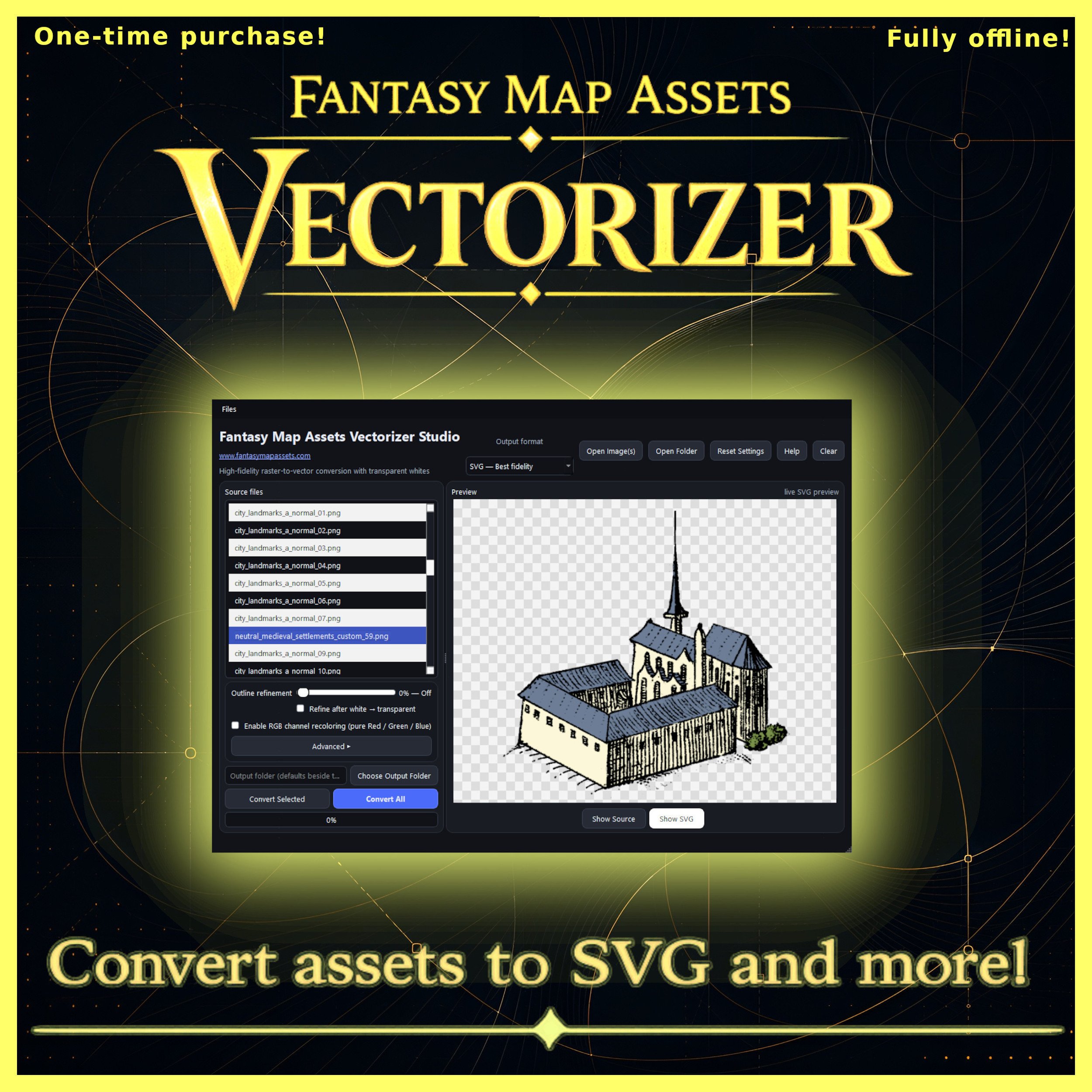
Fantasy Map Assets Vectorizer, available for Windows and macOS, is a desktop Wonderdraft assets converter tool designed around this problem. Its central purpose can be summarized by the product’s own description: “Convert raster fantasy map assets into vector graphics.” More specifically, the software is designed to quickly and easily convert your raster map assets into scalable vector graphics.
That may sound like a purely technical operation. In practice, however, converting map symbols from raster images into vectors touches on a much older question in cartography: how do we preserve, reproduce and transform a library of visual symbols without losing its character?
Buy the Fantasy Map Assets Vectorizer here:
From Engraved Symbols to Digital Cartography Assets
Historical maps were rarely made from completely unique graphical elements. Cartographers developed visual vocabularies.
Mountains had recognizable forms. Settlements were represented by small architectural symbols. Forests could be suggested through repeated trees. Ships, sea monsters, towers, ruins, roads and political boundaries became part of an increasingly sophisticated visual language.
Printing encouraged this process even further. Once an image had been carved, engraved or otherwise prepared for reproduction, it could become a reusable graphical component. In a broad sense, historical cartographers were already working with something resembling an asset library.
Modern cartography assets continue that tradition digitally.
Instead of engraved blocks or hand-copied illustrations, contemporary fantasy cartographers download collections of PNG symbols representing mountains, trees, castles, villages, cliffs, ruins, roads, vegetation and countless other elements. These collections have helped transform fantasy mapping from a specialized illustration discipline into something accessible to worldbuilders, writers, tabletop role-playing game creators and independent artists.
The enormous advantage of digital assets is reuse. Their limitation is that many of them remain fundamentally raster images.
Why a Wonderdraft Assets Converter Tool Matters
Raster graphics are constructed from pixels. PNG, JPG, WEBP, BMP and TIFF files ultimately describe images through a fixed pixel grid. At their intended resolution, they can look excellent. Enlarging them significantly is another matter.
The familiar result is a loss of visual cleanliness: curves become stair-stepped, outlines reveal pixels and small irregularities become increasingly visible.
Vector graphics operate differently. An SVG does not simply preserve a fixed grid of colored pixels. Shapes are represented mathematically through paths, curves and geometric information. As a result, vector artwork can be enlarged or reduced without the same resolution-dependent degradation.
This difference is particularly relevant to fantasy cartography because map symbols are frequently reused at dramatically different scales.
A mountain originally intended as a small Wonderdraft asset, for example, might later be needed for a large printed map, a book illustration, a poster or an entirely different design project. Turning the source into a vector can make that artwork substantially more adaptable.
Fantasy Map Assets Vectorizer approaches this transformation as a specialized Wonderdraft assets converter tool, rather than expecting the cartographer to manually reconstruct every symbol in a general-purpose vector editor.
It accepts PNG, JPG/JPEG, WEBP, BMP and TIFF images and can export assets as SVG, vector PDF, transparent PNG or indexed PNG with transparency.
That makes conversion useful not only as an end in itself, but as a bridge between different artistic workflows.
Wonderdraft Assets and the Modern Fantasy Cartographer
Wonderdraft has played an important role in the contemporary fantasy-mapping ecosystem because it allows mapmakers to expand their visual vocabulary through custom assets.
This has encouraged artists to create extensive collections of Wonderdraft assets: trees, mountains, buildings, decorative symbols and regional styles that can radically change the appearance of a map.
But these collections are often distributed as raster PNG files.
There is nothing inherently wrong with that. Raster artwork is convenient, widely supported and capable of retaining subtle hand-painted textures. Vectorization is therefore not about declaring one format superior to another. It is about giving an existing collection another possible life.
A cartographer might have hundreds of older assets whose style remains useful but whose resolution has become restrictive. Another artist might want to incorporate the silhouette of a favorite mountain into a vector-based publication. A designer could need the same symbol at several radically different dimensions.
In each case, conversion becomes a form of preservation and adaptation.
Turning Cartography Assets Into SVG Without Losing Their Character
One of the difficult aspects of automatic vectorization is deciding what the software should consider to be the actual shape of an image.
Imagine a hand-drawn tower. At normal size, its outline may appear smooth. Magnified closely, however, that boundary consists of hundreds of tiny pixel steps.
A literal conversion of every irregularity can produce an unnecessarily complicated vector. Excessive smoothing creates the opposite problem: the tower loses the small imperfections responsible for its hand-drawn personality.
Fantasy Map Assets Vectorizer therefore includes Outline Refinement, designed to smooth jagged or pixelated silhouettes before vectorization while retaining the overall form of the source.
This matters especially for stylized cartography assets. Fantasy-map symbols are rarely supposed to resemble sterile corporate icons. Their irregularity is often part of their charm.
Successful conversion is consequently less about producing perfect geometry than about finding an appropriate compromise between cleanliness and character.
The software also lets the user choose whether refinement takes place before or after white-background removal. It is a relatively technical detail, but a useful one: the order of image-processing operations can affect how edges are interpreted.
White Backgrounds, Transparency and Older Fantasy Map Resources
Transparency is another apparently small technical feature with major practical consequences.
Many older fantasy map resources, scanned drawings and traditional icon collections were created on white backgrounds. This was natural when the artwork was intended for paper. In a digital map, however, that white rectangle can become an obstacle.
Fantasy Map Assets Vectorizer can automatically transform pure white areas into transparency during conversion. Neutral grayscale can also be translated into opacity, which can be particularly useful for line-based artwork.
This creates an interesting connection between traditional and digital cartography.
A symbol originally drawn as dark ink on white paper can potentially be cleaned, interpreted and prepared for use over parchment textures, colored terrain or other map backgrounds without manually erasing every white area.
For creators maintaining large libraries of older fantasy map resources, this kind of operation can be as valuable as vectorization itself.
A Wonderdraft Assets Converter Tool for RGB Custom Assets
One of the more specialized functions concerns RGB Wonderdraft assets.
Certain custom assets use pure red, green and blue channels as controllable color regions. Fantasy Map Assets Vectorizer can recognize these RGB areas and replace each channel with a chosen color and opacity before export.
This turns conversion into something more creative than merely changing file extensions.
A single source symbol can become the basis for several stylistic variations. Roofs, vegetation, heraldic elements or other colored regions can be reinterpreted without returning to the original artwork and manually repainting each file.
For worldbuilders, this can be especially useful when constructing visual distinctions between regions or cultures. The same architectural family might appear in different colors across several kingdoms, for instance, maintaining graphical consistency while still giving each region its own identity.
The converted result can then be exported in the format best suited to the next stage of production.
Why Batch Conversion Matters for Large Wonderdraft Assets Libraries
Fantasy cartography tends to grow through accumulation.
A creator rarely stops at five mountains and three trees. Over time, collections can expand into hundreds or even thousands of cartography assets spread across multiple thematic sets.
At that scale, converting images individually becomes impractical.
Fantasy Map Assets Vectorizer therefore supports folder-based batch processing, allowing many assets to be imported and exported during the same operation. For someone maintaining a substantial collection of Wonderdraft assets, batch conversion is arguably one of the application’s most practical features.
It transforms vectorization from an occasional image-editing task into a possible library-management workflow.
A creator could, for example, preserve the original PNG collection for Wonderdraft while producing a parallel SVG archive for other illustration and publishing projects. Optimized transparent PNG versions could also be generated when vector output is unnecessary.
The important point is that conversion does not have to destroy or replace the original library. It can extend it.
Fantasy Map Resources Beyond Wonderdraft
Although the software is particularly relevant as a Wonderdraft assets converter tool, its usefulness is not limited to Wonderdraft.
Hand-drawn symbols, fantasy-map icons, cartographic illustrations and other raster artwork can all potentially benefit from the same conversion process.
An SVG version of a symbol can be valuable in graphic-design software, page-layout applications, vector editors and print workflows. Vector PDF output can be useful when preparing material for publication, while transparent PNG remains convenient for software that works primarily with raster images.
This is one reason image converters occupy an understated but important place in creative workflows. Their purpose is not necessarily to create the artwork. Their purpose is to make existing artwork usable in more contexts.
For independent artists in particular, that distinction matters. Building a collection of fantasy map resources can require years of drawing, purchasing, organizing and refining assets. A conversion tool can help prevent that accumulated visual library from becoming tied permanently to one resolution, one format or one application.
Cartography Assets as an Artistic Archive
There is also a more interesting cultural dimension to all of this.
Digital assets are easy to think of as disposable files, but a well-developed map-symbol collection is effectively an artistic archive. It records stylistic decisions about how mountains should look, how cities should be represented, how forests should be patterned and how imaginary cultures express themselves visually.
Historical cartographers faced similar questions with different technologies.
A seventeenth-century engraver could not simply enlarge a tiny printed mountain indefinitely. A twentieth-century illustrator working with physical reproduction had another set of constraints. Today’s fantasy cartographer deals with pixels, resolution, transparency, color channels and file compatibility.
The technology changes. The desire to preserve and reuse visual language does not.
Seen from this perspective, vectorization is part of a much longer history of adapting images to new methods of reproduction.
Fantasy Map Assets Vectorizer: Conversion as Preservation and Reinvention
Fantasy Map Assets Vectorizer is most interesting when understood not simply as a file converter, but as a practical intermediary between raster fantasy artwork and modern vector workflows.
It can convert PNG, JPG/JPEG, WEBP, BMP and TIFF sources; export SVG and vector PDF files; generate transparent PNGs; refine outlines; remove white backgrounds; reinterpret grayscale as opacity; recolor RGB Wonderdraft assets; preview changes; and process complete folders in batches.
Everything runs offline, the application requires no subscription, and it is sold as a one-time purchase with versions available for Windows x64 and macOS Intel.
For mapmakers already sitting on a substantial collection of Wonderdraft assets or other fantasy map resources, its most compelling purpose may simply be freedom: freedom to resize an old symbol, prepare it for another application, clean its background, recolor it, archive it as SVG or reuse an existing artistic library in a completely different project.
And that is ultimately what good creative tools tend to accomplish.
They do not replace the artist, the cartographer or the original artwork. They remove technical barriers between an idea and the next way that idea might be used.
For centuries, cartographers have adapted symbols to new printing methods, new materials and new visual conventions. Today’s transition from pixels to vectors is simply another chapter in that history. A specialized Wonderdraft assets converter tool such as Fantasy Map Assets Vectorizer gives modern mapmakers a simple way to take part in that transition while preserving the character of the cartography assets they already value.